
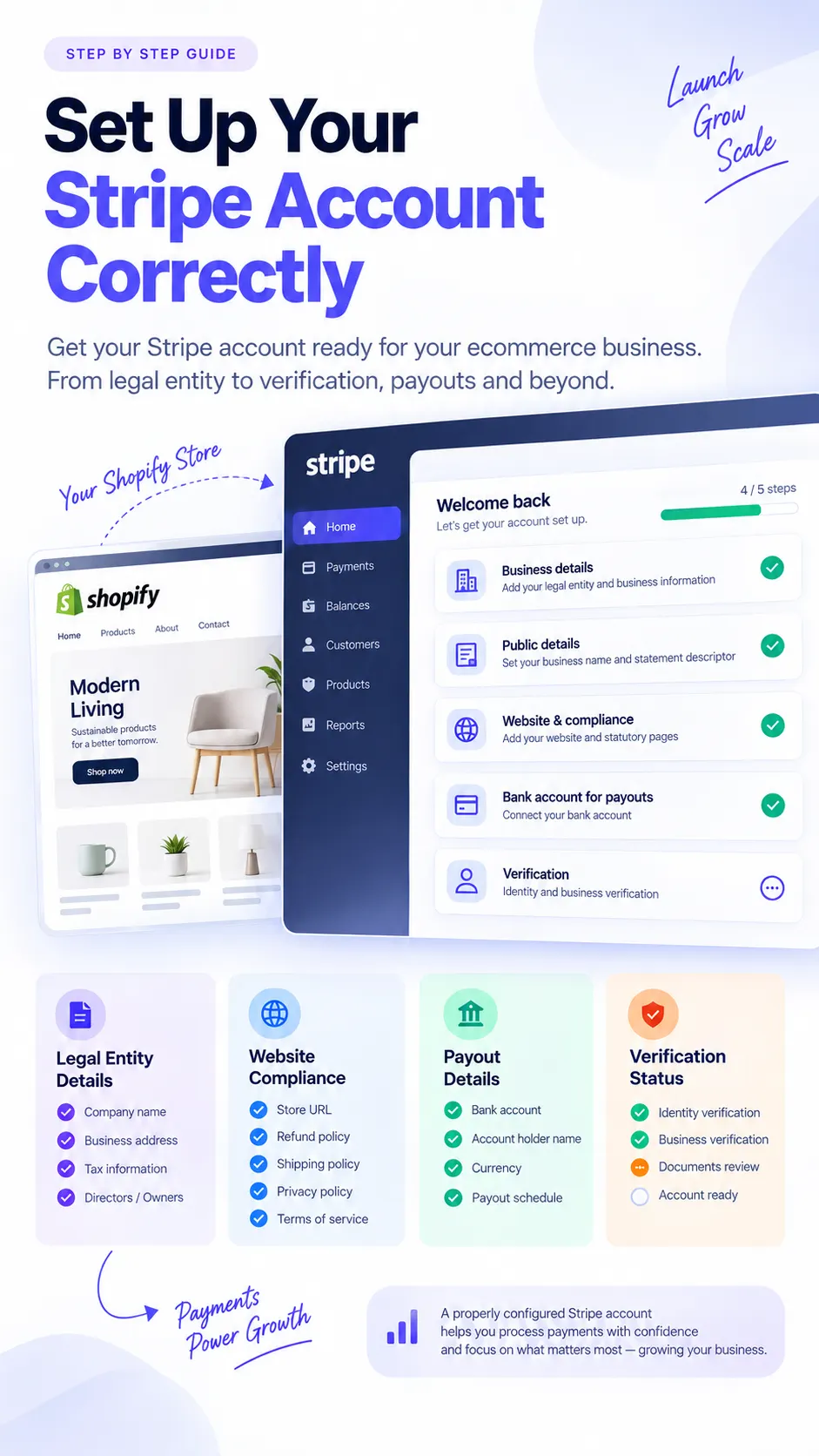
Short answer
Correct Stripe setup means one consistent business story
A correct Stripe setup means the legal entity, Shopify store, website, bank details, public business details, products, policies and customer-facing information all point to the same real business. The goal is not to make the business look different. The goal is to make Stripe, your customers and your own operations see the same accurate picture.
Start with the correct legal entity
The entity registered with Stripe should be the real person or organization operating the ecommerce business and receiving the payments. Choose the structure that accurately reflects your business registration and country requirements.
Limited company
Use the registered company name, number, address, owners and representatives that match official records.
LLC
Use the LLC details that match the operating ecommerce business and its ownership records.
PLC
Use public company details and representative information that match the actual account operator.
LLP
Use partnership registration information and representative details that can be verified.
Sole trader or sole proprietor
Use the individual operator details and address information that accurately represent the business.
Partnership
Use the partnership information, partners and operating details required in your market.
Other supported structures
Use the closest supported structure only when it accurately matches the business Stripe is being asked to process for.
Do not use someone else's company, address or identity to open a Stripe account. That can create verification problems and make the account inconsistent with the store that is actually taking payments.
Make Stripe details and store details match
Stripe account details should be supported by the information customers and reviewers can see on the store. A consistent setup makes it easier to understand who operates the business, what it sells and where customers can get support.
- Legal entity
- ABC Trading Ltd
- Business name
- Nordic Home
- Website
- nordichome.com
- Activity
- Home furniture and accessories
The Shopify store should support that information through the footer, legal pages, contact page, terms, policy pages and product catalogue. Customers should not have to guess which company operates the store.
Legal business name vs store name
Your legal business name is the officially registered entity. Your trading name or public store name is the customer-facing brand.
For example, ABC Trading Limited can operate a store called Nordic Home. That relationship can appear in the footer, terms, contact page or legal section so customers understand who operates the store.
Do not enter the Shopify store name as the legal entity
Only use the Shopify store name as the legal entity if it is actually the registered legal business name. If the company is registered as London Ecommerce Ventures Ltd and the store trades as My Fashion Store on myfashionstore.com, the legal entity should remain London Ecommerce Ventures Ltd where Stripe asks for legal information.
The store name belongs in public business fields, customer-facing descriptions, statement descriptor planning and website branding.
Business address accuracy
Use the address that accurately reflects the account type and business structure. A company may have a registered address and an operating address. A sole trader may need to use their own verified address, depending on local requirements.
Avoid random virtual addresses if they do not genuinely relate to the business. Address mismatches can make verification harder and create unnecessary account review friction.
Use the correct website URL
Use the customer-facing Shopify domain that represents the products being processed. If the store sells from a custom domain, that is usually the most useful URL to provide.
Each Stripe-connected website should accurately represent the business, products, pricing, policies and support information tied to the payments being processed.
Do not submit an unfinished Shopify store
Before processing live payments, the public store should look like a real operating ecommerce business. Avoid submitting a store that still looks like a test build or placeholder site.
Complete statutory and customer-facing pages
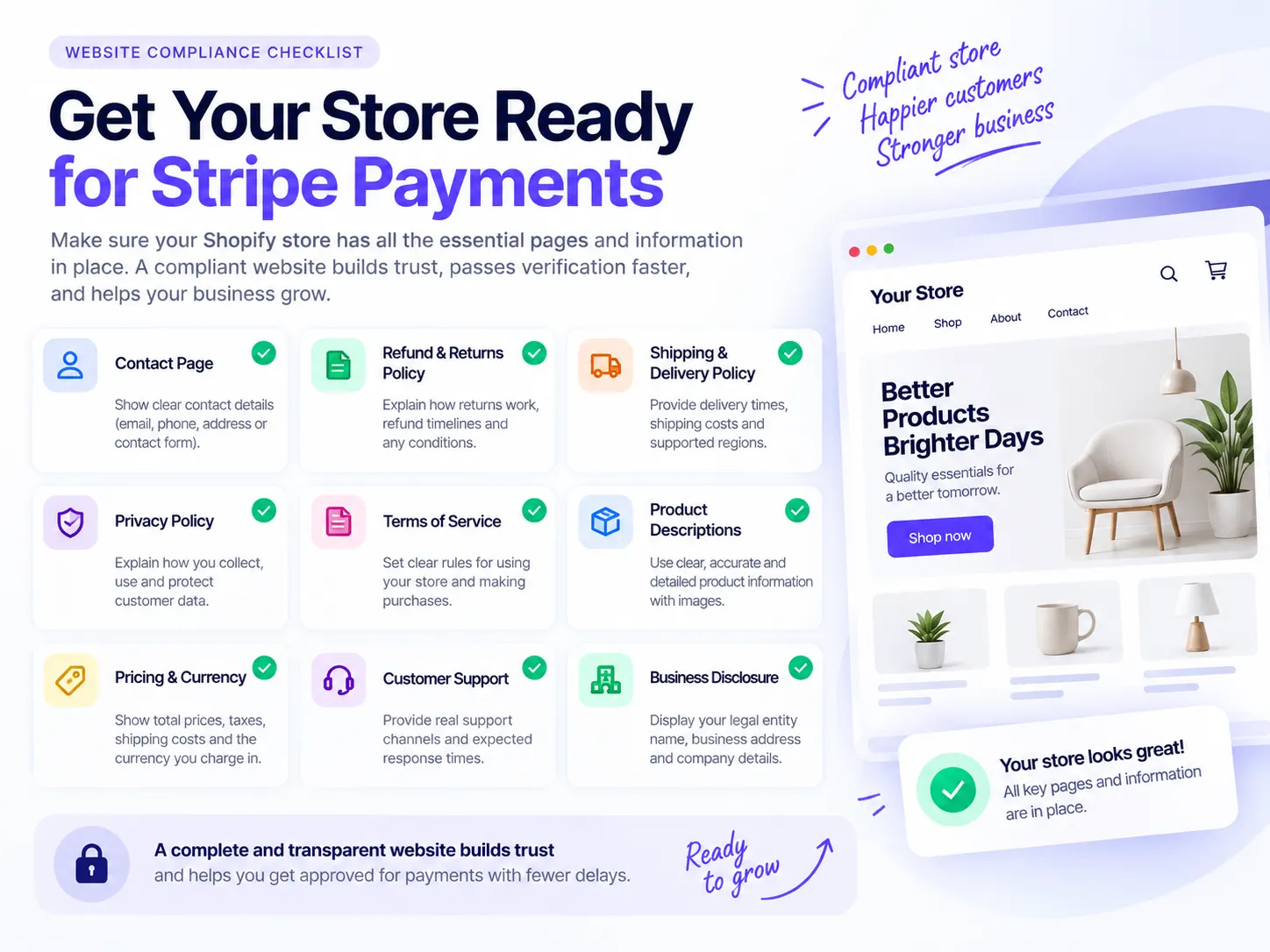
Website readiness helps customers understand who they are buying from, what will happen after payment and how support issues are handled. Exact legal requirements vary by jurisdiction, but these pages are a practical foundation for most ecommerce stores.
Contact page
Include a real support email, contact form or support channel, plus clear business contact details where required.
Refund and returns policy
Explain refund eligibility, return windows, return conditions, processing times and customer responsibilities.
Shipping and delivery policy
Explain delivery areas, shipping methods, timelines, fulfilment expectations and tracking availability.
Privacy policy
Explain how customer data is collected, used, stored and shared.
Terms of Service
Set the commercial terms for purchases, account use, limitations and customer obligations.
Cancellation policy
Explain how customers can cancel orders, services, subscriptions or bookings where cancellation is relevant.
Make your legal entity visible on the store
If appropriate for your jurisdiction, make the operating entity visible in the store footer, legal pages, terms or contact page.
Example footer text: Nordic Home is operated by ABC Commerce Ltd. Company No. 12345678. Registered in England and Wales.
Exact disclosure requirements depend on jurisdiction. Use wording and placement that matches the legal requirements for your market.
Configure Stripe public business details carefully
Legal information tells Stripe who owns and operates the account. Public business information helps customers recognize the business on receipts, bank statements and payment flows.
Example: legal entity ABC Commerce Ltd, store nordichome.com, public business name Nordic Home, statement descriptor NORDICHOME.
Statement descriptor recognition
A recognizable statement descriptor can reduce customer confusion and potential disputes because buyers can connect the charge to the store where they made the purchase.
For example, BEAUTIFULCHAIRS is more recognizable than ABCVENTURES for beautifulchairs.com.
Describe your business accurately
Avoid vague or unrelated descriptions. Weak: Ecommerce. Better: Online retailer selling men's and women's casual clothing directly to consumers through our Shopify store.
Do not enter a lower-risk or unrelated description to make the business look different from what it actually sells.
Products must match the Stripe business description
Your product catalogue should match the business category and description used in Stripe. A clothing retailer profile becomes inconsistent if the website sells supplements, financial services, digital courses or high-value watches.
If your product range changes materially, update your Stripe information and website disclosures where appropriate.
Check Stripe restricted and prohibited business rules first
Some categories require extra review or may not be supported by Stripe in a particular country. Examples can include financial services, pharmaceuticals, travel, CBD, cryptocurrency, high-value goods and regulated sectors.
Rules vary by country. Legal operation in your market does not mean Stripe must support the activity. If your activity falls into a restricted category, review Stripe documentation and contact Stripe before processing payments.
Do not process payments for another business
Do not let friends process through the account, connect unrelated Shopify stores, send another merchant's payments through the account or sell undisclosed products from another company.
A Stripe account should process payments for the business that is disclosed, verified and represented by the website.
Multiple Shopify stores under one legal entity
Operating multiple stores under one legal entity is different from processing for unrelated companies. For example, ABC Commerce Ltd may operate store-one.com, store-two.com and store-three.com.
Each store should make the relationship clear. A deeper guide for multiple Stripe accounts and store structures is planned, but is not linked here until that page exists.
Bank account ownership
The payout account should legitimately belong to the business or person operating the Stripe account. For example, if the Stripe account is ABC Commerce Ltd, the bank account should also belong to ABC Commerce Ltd.
Bank ownership mismatches can create verification friction and payout problems.
Director and beneficial-owner information
Stripe may ask for information about directors, company representatives, owners, beneficial owners or persons with significant control.
Do not nominate someone only because verification seems easier. The listed people should accurately reflect the business ownership and control structure.
Identity verification
Verification requirements differ by country and account type. Possible documents can include a passport, driving licence, national identity document, business registration documents or address evidence.
Prepare clear, current documents that match the account information you entered.
Keep the website compliant after activation
Stripe setup is not a one-time task. Update Stripe and your website when material business details change.
- Legal entity
- Business address
- Website
- Trading name
- Products
- Business model
- Ownership
- Customer support details
- Fulfilment model
Customer service matters
Good account setup also depends on operational readiness. Answer customer emails, ship promptly, provide tracking, manage refunds, cancel orders when needed, investigate fraud, handle disputes and keep fulfilment records.
These habits help reduce avoidable problems and make it easier to respond if information is requested later.
Keep evidence for every order
Keep useful order evidence such as order details, customer information, shipping tracking, delivery confirmation, customer emails, refund records, product descriptions, supplier records and proof of fulfilment.
Evidence should be organized enough that your team can respond quickly to customer support questions, fraud reviews or disputes.
Do not suddenly process an unrelated business model
Material business changes should be reflected in Stripe information and public website content. For example, a clothing store that changes into a high-value electronics store is no longer operating the same risk profile described at setup.
Update business details before processing a materially different product line or model.
Consistency table
Use these examples to compare a coherent setup with a setup that creates avoidable mismatch signals.
Good setup
- Stripe legal business
- ABC Trading Ltd
- Shopify legal disclosure
- ABC Trading Ltd
- Bank account
- ABC Trading Ltd
- Store trading name
- Nordic Home
- Domain
- nordichome.com
- Stripe public name
- Nordic Home
- Statement descriptor
- NORDICHOME
- Product category
- Home furniture
- Website products
- Home furniture
Problem setup
- Stripe legal business
- ABC Trading Ltd
- Store footer
- XYZ Holdings Ltd
- Bank account
- John Smith
- Stripe website
- anotherstore.com
- Store domain
- nordichome.com
- Stripe category
- Software
- Website products
- Furniture
Common Stripe setup mistakes
Most setup issues are avoidable when the account, website and customer-facing details are prepared before live processing starts.
Legal entity does not appear anywhere on the website
Problem: Customers and reviewers cannot connect the store to the operating business.
Fix: Add accurate legal disclosure where appropriate, such as the footer, terms, contact page or legal section.
Wrong legal name entered
Problem: Stripe information does not match official records.
Fix: Use the registered legal name where Stripe asks for legal entity information.
Unfinished website submitted
Problem: The store looks like a test build rather than a real business.
Fix: Complete products, policies, support information and public pages before processing live payments.
Website URL does not match the store being processed
Problem: The Stripe website points to a different store or inactive domain.
Fix: Use the customer-facing Shopify domain that represents the products being sold.
Missing refund policy
Problem: Customers cannot understand their refund rights or process.
Fix: Publish a clear refund and returns policy before launch.
Poor product descriptions
Problem: Products are vague, incomplete or inconsistent with the business category.
Fix: Write clear product descriptions, pricing and fulfilment expectations.
Misleading business category
Problem: Stripe sees one activity while the website shows another.
Fix: Use the category and description that accurately match the actual business.
Inconsistent company information
Problem: Different names, addresses or entities appear across Stripe, Shopify and policies.
Fix: Audit the account, footer, policy pages, contact page and bank details for consistency.
Using another person's identity
Problem: The account does not represent the real operator or owner.
Fix: Use accurate representative, director and beneficial-owner information.
Ignoring restricted-business rules
Problem: The business may need extra review or may not be supported.
Fix: Review Stripe restricted and prohibited business rules before processing payments.
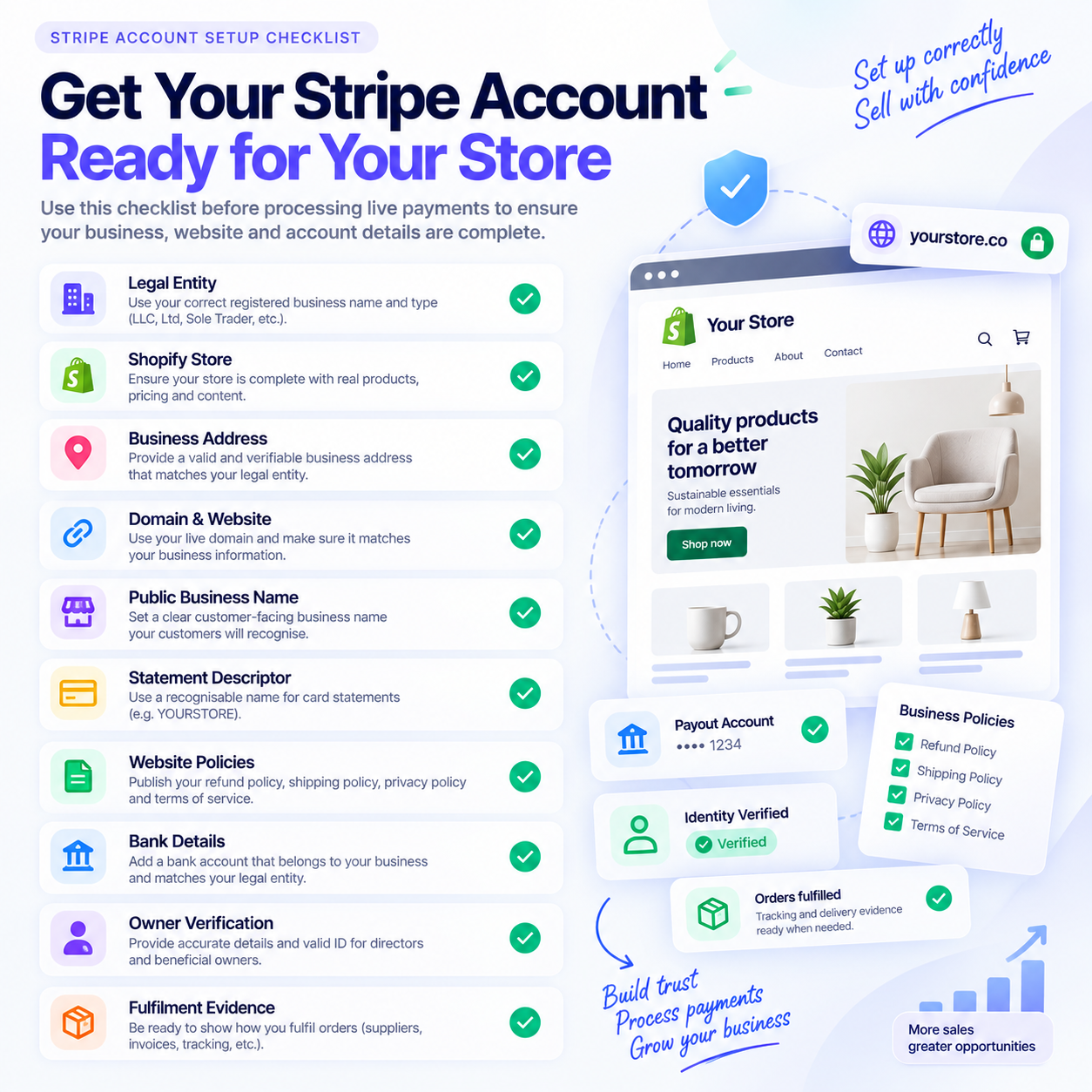
Stripe account setup checklist
Use this checklist before processing live payments through Stripe on a Shopify or ecommerce store.
- Real legal entity is entered correctly.
- Legal entity matches the business operating the Shopify store.
- Store identifies the operating legal entity where required.
- Stripe website URL points to the real store.
- Business description matches what the merchant actually sells.
- Products are visible and properly described.
- Contact page is complete.
- Refund and Returns Policy is published.
- Shipping and Delivery Policy is published.
- Privacy Policy is published.
- Terms of Service are published.
- Public business name matches the store brand.
- Statement descriptor is recognizable to customers.
- Bank details belong to the appropriate person or company.
- Director and beneficial-owner details are correct.
- Website contains no unfinished or placeholder content.
- Stripe prohibited and restricted business rules have been checked.
- Evidence of fulfilment and customer service can be provided if requested.
Final point
The safest approach is not to try to make your business look acceptable to Stripe. Make your Stripe account accurately represent your real business. Your legal entity, website, products, customer-facing details, policies, banking information and business description should all form one consistent picture.
This will not eliminate every future review or restriction. Stripe independently reviews accounts and may impose restrictions because of regulatory, financial partner, industry or risk requirements. But accurate and transparent information removes many avoidable problems caused by poor account setup.
Related CartDNA resources
Related planned Stripe guides
These Stripe guide pages are planned but not linked as live pages yet.
Legal entity details
Coming soonHow to prepare company, owner, director, address and tax details for Stripe.
/resources/guides/stripe/legal-entity-details
Verification checklist
Coming soonWhat to prepare before Stripe asks for documents or additional account information.
/resources/guides/stripe/verification-checklist
Website compliance
Coming soonHow to prepare store policies, contact details and product pages for payment readiness.
/resources/guides/stripe/website-compliance
Multiple accounts
Coming soonWhen multiple stores or regions may need separate account planning.
/resources/guides/stripe/multiple-accounts
Account restrictions and closures
Coming soonCommon triggers and operational preparation for account reviews.
/resources/guides/stripe/account-restrictions-closures
Payouts, holds and reserves
Coming soonHow merchants should think about pending balances, payout timing and reserves.
/resources/guides/stripe/payouts-holds-reserves
Disputes and chargebacks
Coming soonEvidence and customer-service habits that support dispute handling.
/resources/guides/stripe/disputes-chargebacks
Official resources
Review Stripe documentation directly for the current rules that apply to your market and account type.
FAQ: Stripe account setup
What information do I need to set up a Stripe account?
You usually need accurate business details, legal entity information, owner or representative details, a valid website or business profile, bank account information, product details and customer-facing policies. Exact requirements vary by country and business type.
Can my Stripe legal business name be different from my Shopify store name?
Yes. Your legal business name can be different from your public store name. The important point is that the relationship is clear and consistent across Stripe, your website, policies and customer-facing information.
Should I use my Shopify store name as my legal entity?
Only if that is actually your registered legal business name. If your company is registered under a different name, use the registered legal name where Stripe asks for legal entity information and use the store name in the relevant public business fields.
Can an unfinished Shopify store cause Stripe setup problems?
Yes. An unfinished store with placeholder content, missing policies, broken links or unclear product information can create avoidable review friction. Complete the store before processing live payments.
Does a correct setup guarantee Stripe will not restrict my account?
No. Stripe can review accounts and apply restrictions for regulatory, financial partner, industry or risk reasons. Correct setup helps reduce avoidable issues caused by inaccurate or inconsistent information.
What is the most common Stripe setup mistake?
One common mistake is inconsistency. The Stripe account, Shopify store, legal entity, bank details, product descriptions, website policies and public business details should all represent the same real business.
This guide is for general merchant education and is not legal, financial or compliance advice. Always review Stripe's official documentation and the requirements shown in your own Stripe account.