
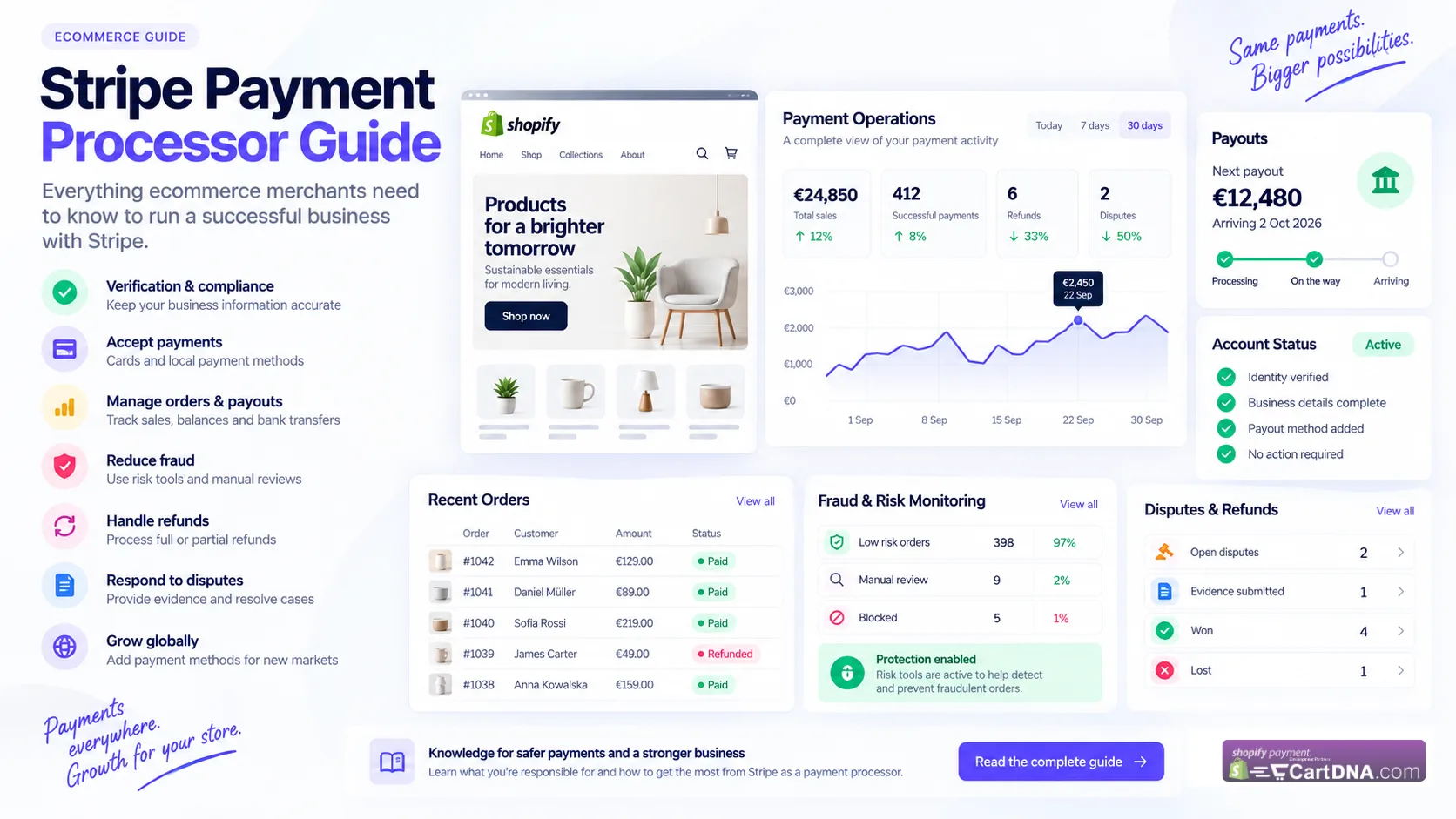
Stripe processes payments. You still operate the business.
Stripe manages payment infrastructure. The merchant manages the business.
Account activation does not mean Stripe has permanently approved every future product, practice or transaction. Your account information, products, policies and operating model need to remain accurate as the business changes.
Understand what Stripe actually does.
Stripe can provide payment processing, payment method integrations, balances and payouts, fraud management tools, dispute workflows, reporting and other financial infrastructure.
Receiving approval to process payments does not mean Stripe has certified the business permanently. It means the account can use relevant Stripe services under the information and circumstances reviewed at that time.
- Payment processing
- Payment method integrations
- Balances and payouts
- Fraud management tools
- Dispute workflows
- Reporting
- Other financial infrastructure
Stripe is not your business operator.
Stripe does not run the Shopify store. The merchant remains responsible for the business customers actually experience.
- Products and services
- Product quality
- Order fulfilment
- Delivery
- Customer service
- Refunds and returns
- Business policies
- Legal obligations
- Tax obligations
- Customer complaints
- Dispute evidence
Common misunderstanding
Merchant belief: Stripe accepted my account, so everything about my business is approved.
Correction: Account activation is permission to use relevant Stripe services under the information and circumstances reviewed at that time, subject to continuing terms and requirements.
Account verification is not something you forget after signup.
Business information can change after processing starts. Your Stripe account should describe the business you operate today, not the business you operated two years ago.
Practical rule: Your Stripe account should describe the business you operate today, not the business you operated two years ago.
Keep your business information accurate.
False, manipulated, inaccurate or misleading information can create avoidable verification and account review problems.
- Legal entity
- Business activity
- Website
- Ownership information
- Business address
- Representatives
- Beneficial owners
- Products and services
- Financial condition where relevant
Legal business name vs store brand.
Customers may know the store as Nordic Home while Stripe verifies ABC Commerce Ltd. The relationship should be clear and consistent.
- Legal entity
- ABC Commerce Ltd
- Shopify store
- Nordic Home
- Domain
- nordichome.com
Example disclosure: Nordic Home is operated by ABC Commerce Ltd.
Make your statement descriptor recognisable.
The statement descriptor helps customers recognise a transaction on a card or bank statement.
If a customer buys from nordichome.com but later sees an unfamiliar abbreviation on the card statement, poor recognition can increase customer confusion and support issues.
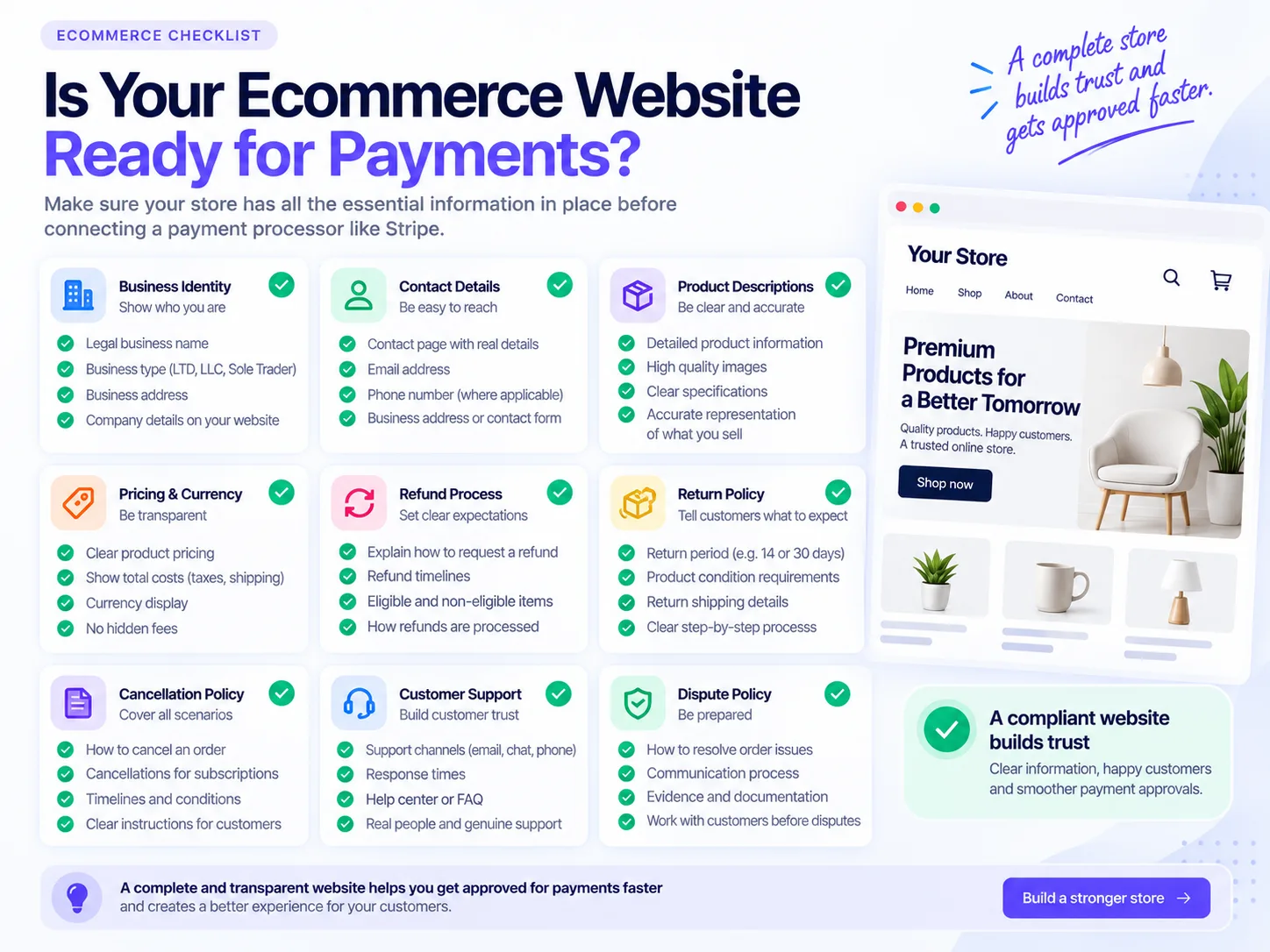
Your website is part of your payment setup.
The ecommerce website is not only a marketing tool. It helps payment providers understand who the business is, what the business sells, how customers contact the business and what happens if something goes wrong.
Website review checklist
- Business identity
- Contact information
- Product descriptions
- Pricing
- Refund process
- Return policy
- Dispute policy
- Cancellation information where applicable
- Legal or export restrictions where applicable
- Promotion terms where applicable
Four simple questions
A legal business is not automatically a Stripe-supported business.
A product can be legal to sell in a country but still fall into a category Stripe prohibits or restricts.
Restrictions can relate to legal obligations, financial partner requirements, card network requirements, financial risk and country-specific requirements.
Check Stripe's current prohibited and restricted businesses list before entering a new industry, selling new products, expanding into another jurisdiction or changing business model. Avoid choosing a vague or inaccurate category.
Fraud prevention tools reduce risk. They do not eliminate it.
Stripe Radar and other fraud tools can help evaluate transaction risk, but a payment can succeed today and still become disputed later.
- Reviewing unusually large orders
- Checking suspicious order patterns
- Using appropriate authentication tools
- Maintaining fulfilment evidence
- Investigating abnormal customer behaviour
- Training support teams to spot risk signals
A successful payment is not the end of the transaction.
Customer orders
Payment succeeds
Order fulfilled
Product delivered
Customer satisfied
Problems after payment can create:
- Refund requests
- Customer complaints
- Delivery disputes
- Product disputes
- Fraud claims
- Chargebacks
A high-quality checkout cannot compensate for poor fulfilment or poor customer service.
Stripe does not remove chargeback risk.
Stripe provides dispute-management infrastructure, but merchants need to respond appropriately and provide evidence.
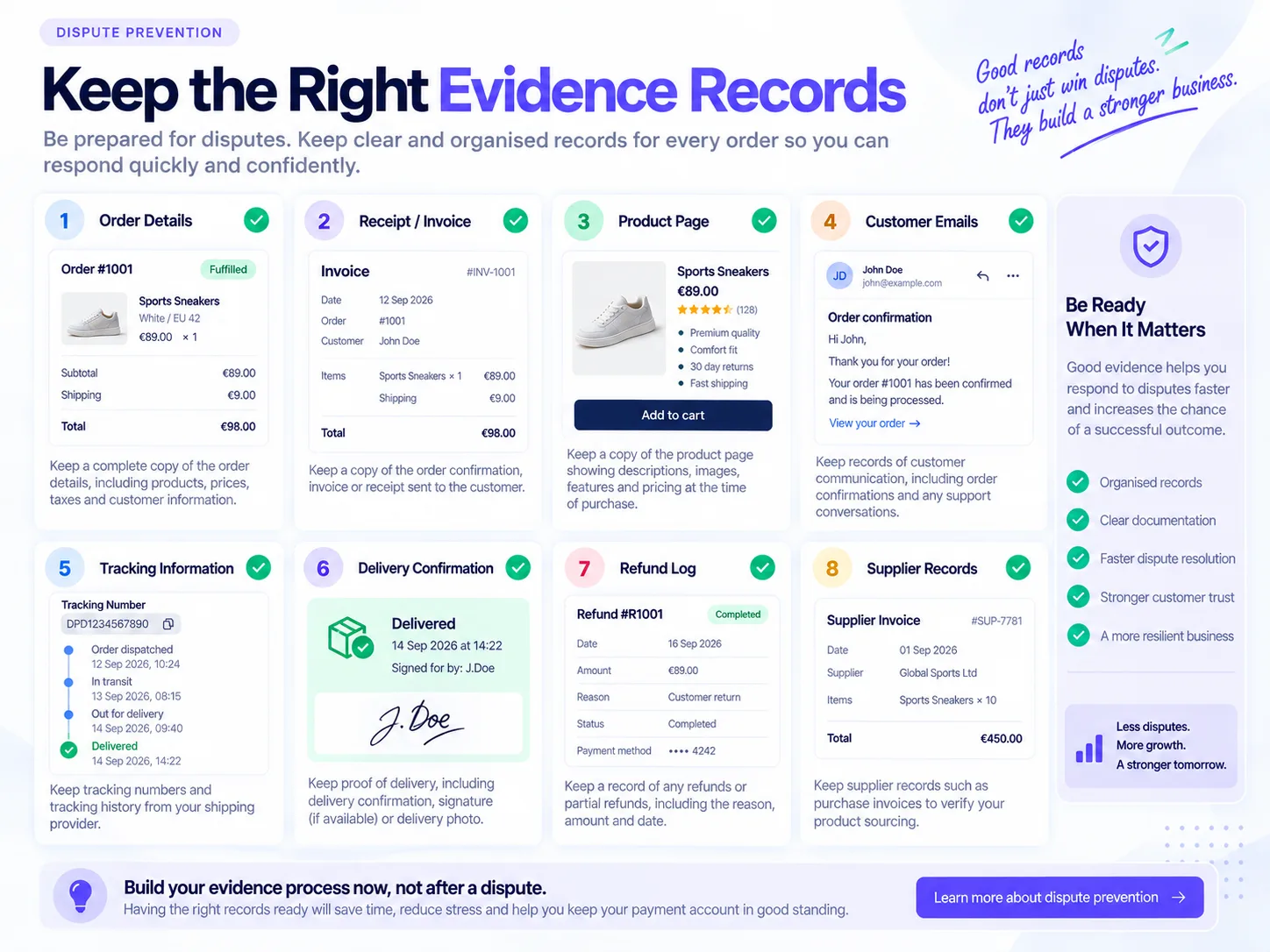
Useful evidence
- Order confirmation
- Product information
- Customer communication
- Tracking information
- Delivery confirmation
- Refund records
- Terms accepted by the customer
- Relevant transaction information
Do not wait until your first dispute to decide what evidence your business should retain.
Refunds are your responsibility.
A refund policy should reflect real operations, not just exist for compliance.
- Whether returns are accepted
- How long customers have
- How to request a return
- Who pays return postage
- When refunds are issued
- Whether partial refunds are available
- Which products are non-returnable where legally permitted
- How cancellations work
Good customer service is part of payment risk management.
- Complaints
- Cancellations
- Delivery issues
- Refund requests
- Customer support response times
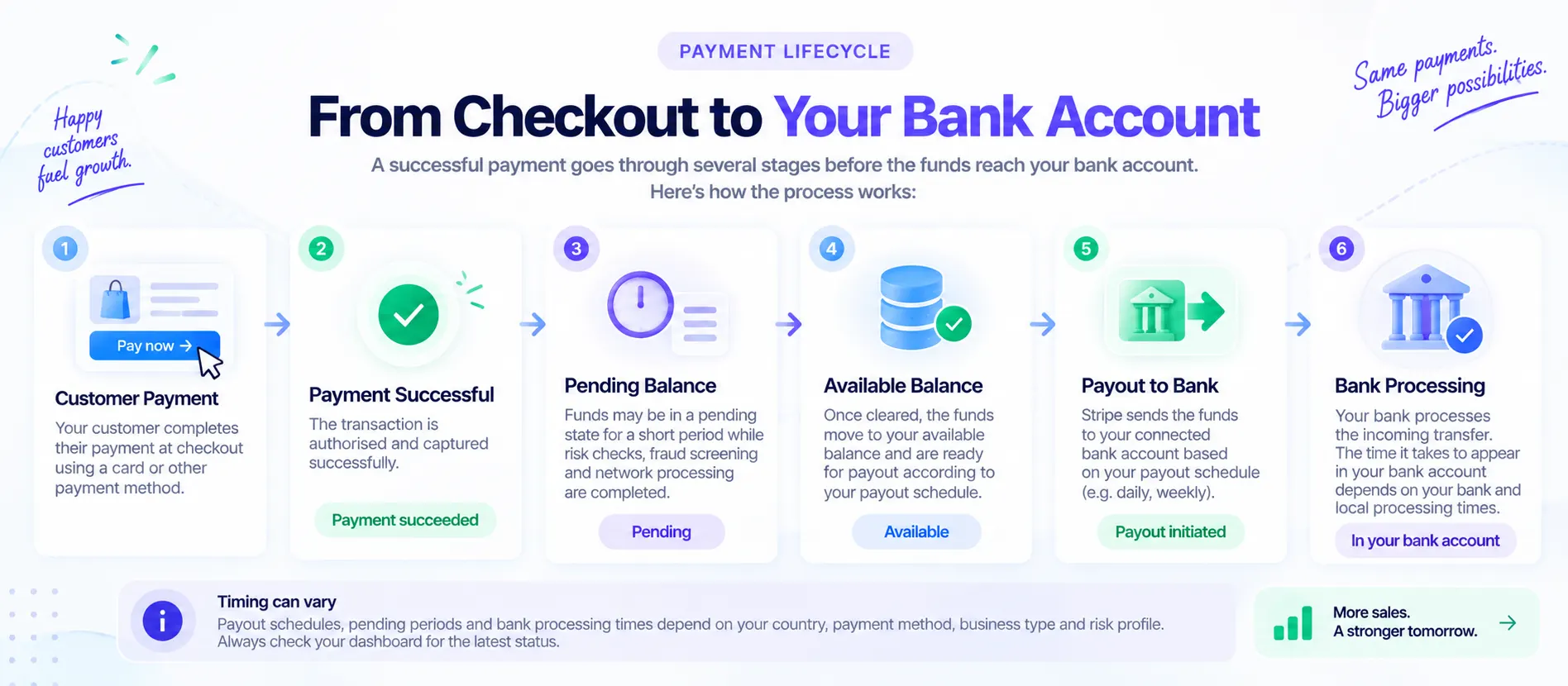
Understand the difference between a sale, balance and payout.
Successful payment
The customer's transaction completed successfully.
Pending balance
Funds may still be pending before becoming available.
Available balance
Funds are available within the Stripe balance under applicable rules.
Payout
Funds are sent from Stripe toward the configured bank account.
Bank processing
The bank may take additional time to make the transfer available.
A delayed payout does not automatically mean your account is closed.
Merchants should first determine the actual status before assuming there is an account restriction.
- Payment status
- Pending balance
- Available balance
- Payout schedule
- Payout status
- Bank details
- Failed payout notifications
- Account notifications
- Verification requests
Do not confuse normal balance and payout timing with an account restriction.
Understand holds, reserves and negative balances.
Processors manage financial exposure from payments, refunds and disputes.
Reserved funds, delayed availability, negative balances, refund exposure and dispute exposure can all affect cash flow planning.
Merchants should not treat every processed payment as immediately available operating cash.
Keep evidence before you need it.
For physical ecommerce orders, retain organised records that help your team respond quickly if a customer or processor asks for evidence.
- Customer order
- Order confirmation
- Invoice or receipt
- Product description
- Customer communication
- Shipping information
- Tracking number
- Delivery confirmation
- Refund history
- Supplier information
- Fulfilment records
For digital products and services, evidence may differ. The principle is the same: retain records that show what was purchased, delivered, accessed, accepted or refunded.
Do not process payments for undisclosed businesses.
Transparency is safer than trying to make one business look like another.
- Friends processing through the account
- Partners using the account without disclosure
- Unrelated businesses using the account
- Undisclosed products or services
- Hiding the real business model
Multiple stores need a clear business structure.
A single legal entity can operate multiple brands, but the payment setup should accurately represent the structure.
Example: ABC Commerce Ltd operates
- nordichome.com
- modernliving.com
- gardenstore.com
The payment setup should accurately represent:
- Legal entity
- Brands
- Websites
- Products
- Business activities
Rapid growth needs good payment operations.
Store normally processes GBP 20,000 per month. A viral ad campaign increases sales dramatically. At the same time the merchant launches expensive products and starts selling internationally.
The business now looks materially different and the Stripe profile should remain current.
Watch these areas as your business scales.
Customer service
Can support handle increased order volume?
Fulfilment
Can orders be dispatched at the expected speed?
Refunds
Can the business fund and process refunds efficiently?
Fraud
Are suspicious orders increasing?
Disputes
Are complaints turning into chargebacks?
Cash flow
Could the business handle refunds or disputes without relying on tomorrow's sales?
Business information
Does the Stripe profile still describe what the business actually does?
Do not depend blindly on one payment method.
Stripe alone may be enough for some merchants. Other merchants may need a broader payment strategy across countries and customer preferences.
For example, Stripe plus local payment methods plus other approved payment providers can support a broader checkout strategy.
The objective should not be to bypass a processor's restrictions. It should be to build legitimate payment infrastructure appropriate for the merchant's markets and customer preferences.
Payment processor vs payment orchestration.
A payment processor or PSP provides infrastructure for accepting and processing payments.
Payment orchestration is a broader layer that helps businesses connect and manage payment providers, methods and payment flows across markets.
A merchant selling across Europe may want cards alongside country-specific payment methods that customers recognise locally.
Where CartDNA fits.
CartDNA develops Shopify payment applications that connect supported payment providers and payment methods with Shopify's native checkout.
This can help merchants build a broader payment strategy rather than relying solely on one payment method or provider.
Adding another payment provider does not remove merchant responsibilities. Merchants still need to meet the onboarding, compliance and risk requirements of every payment provider they use.
Merchant responsibility checklist.
Use this checklist before increasing payment volume through Stripe or any other payment processor.
- Is my legal entity information correct?
- Does my website clearly represent my business?
- Does Stripe know what I actually sell?
- Are my owners and representatives current?
- Are my contact details accurate?
- Are my refund and return policies clear?
- Can customers easily contact us?
- Do we respond quickly to problems?
- Do we retain fulfilment evidence?
- Do we monitor suspicious transactions?
- Do we understand our payout schedule?
- Could we handle refunds and disputes financially?
- Have we checked Stripe's current restricted-business rules?
- Have we updated Stripe after significant business changes?
- Are we processing only for the business and products disclosed to Stripe?
If you cannot confidently answer yes, investigate that area before increasing payment volume.
Stripe merchant responsibility checklist
Future image path: /images/resources/stripe-merchant-responsibility-checklist.webp
The key principle.
Using Stripe successfully is not simply about opening an account and connecting it to Shopify.
You are operating a business that happens to use Stripe for payment infrastructure.
Stripe provides powerful payment technology, but you remain responsible for your customers, products, fulfilment, refunds, business information and day-to-day operations.
Keep your information accurate. Maintain a complete website. Communicate with customers. Handle refunds properly. Keep evidence. Monitor fraud and disputes. Understand your cash flow.
That foundation is useful regardless of which payment processor your ecommerce business uses.
Related CartDNA resources
Related planned Stripe guides
These Stripe guide pages are planned but are not linked as live pages yet.
Stripe website compliance checklist
Coming soonA deeper guide to website requirements, policy clarity and storefront consistency.
/resources/guides/stripe/website-compliance
Multiple Stripe accounts
Coming soonHow to think about legal entities, brands, stores and account structure.
/resources/guides/stripe/multiple-accounts
Stripe payouts, holds and reserves explained
Coming soonA deeper guide to balances, payout timing, reserves and cash flow planning.
/resources/guides/stripe/payouts-holds-reserves
Stripe disputes and chargebacks for ecommerce merchants
Coming soonHow to prepare evidence and respond to disputes operationally.
/resources/guides/stripe/disputes-chargebacks
Why Stripe accounts get restricted or closed
Coming soonA practical look at account reviews, restrictions and avoidable risk signals.
/resources/guides/stripe/account-restrictions-closures
Official Stripe resources
Review Stripe documentation directly for current legal terms, support guidance and product documentation.
FAQ: Using Stripe as a payment processor
Is Stripe responsible for my products and customer service?
No. Stripe provides payment infrastructure, but the merchant remains responsible for products, fulfilment, delivery, refunds, returns, customer support and the accuracy of business information.
Does Stripe account approval mean my business is permanently approved?
No. Account activation allows you to use relevant Stripe services under the information reviewed at that time. Stripe can continue to review accounts, especially when business information, products, volume, disputes or risk change.
Why does my website matter when using Stripe?
Your website helps payment providers understand who you are, what you sell, how customers contact you and what policies apply. Incomplete or inconsistent website information can create avoidable verification and review friction.
Does Stripe remove chargeback risk?
No. Stripe provides tools and workflows for disputes, but merchants still need to manage fraud, retain evidence, respond to customers and handle disputes appropriately.
Why has my payout not arrived yet?
A successful payment is not the same as a completed bank payout. Funds may move through pending balance, available balance, payout creation and bank processing. Merchants should check payment status, balance status, payout schedule, bank details and account notifications.
Can I use my Stripe account for another business?
You should not process for an undisclosed business or for products and services not disclosed in your Stripe account application. Each payment setup should accurately represent the real business, products and legal entity involved.
This guide is for general merchant education and is not legal, financial or compliance advice. Always review Stripe's official documentation and the requirements shown in your own Stripe account.