
Account structure
Can you have multiple Stripe accounts under the same legal entity?
Stripe support documentation says businesses can create additional Stripe accounts and that separate accounts can be used for projects, websites or businesses that operate independently.
If projects or businesses operate under the same legal entity, Stripe says the same tax ID and business information can be used across multiple accounts. Stripe also recommends suitable public business information to avoid customer confusion.
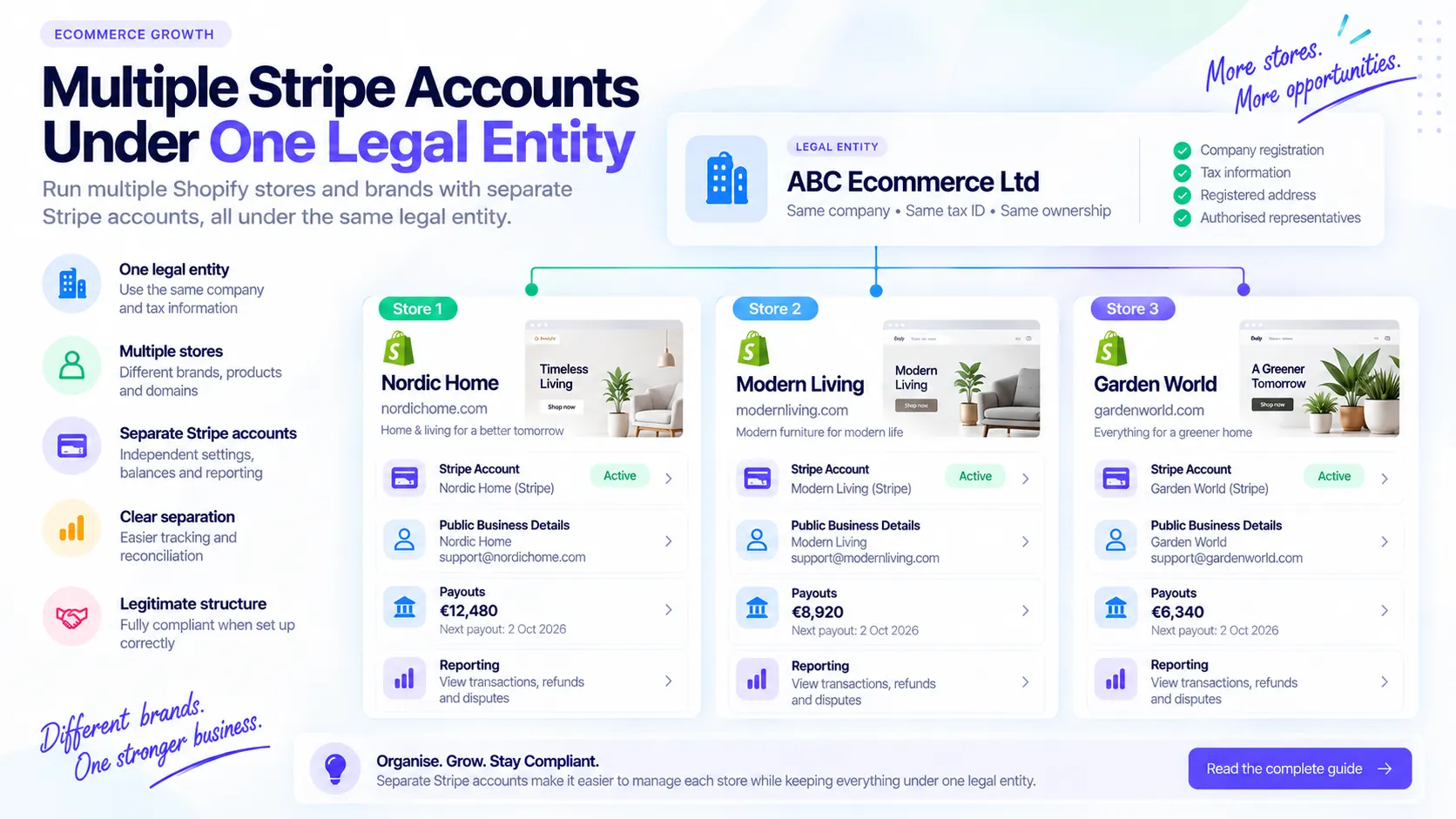
For example, ABC Ecommerce Ltd may operate nordichome.com, modernliving.com and gardenworld.com. All three stores may belong to ABC Ecommerce Ltd while each store has its own customer-facing brand, domain and payment activity.
Legal entity: ABC Ecommerce Ltd
Store: Nordic Home
Domain: nordichome.com
Legal entity: ABC Ecommerce Ltd
Store: Modern Living
Domain: modernliving.com
Legal entity: ABC Ecommerce Ltd
Store: Garden World
Domain: gardenworld.com
What is an additional Stripe account?
An additional Stripe account is a separate Stripe account accessible through the same Stripe Dashboard login or account selector.
Use the term additional Stripe account rather than Stripe sub-account because sub-account can be confused with Stripe Connect connected accounts.
- Settings
- Public details
- Balances
- Reporting
- Payout configuration
- Fraud controls
- Activation or verification requirements
When should an ecommerce merchant consider separate Stripe accounts?
Separate accounts can make sense when one company operates distinct projects, stores, websites or brands and wants clearer operational boundaries.
The goal is not to hide the company behind the stores. The goal is to keep payment operations, reporting and customer-facing details aligned with each brand.
- Cleaner reporting by store
- Separate public business details
- Easier reconciliation
- Store-specific payment settings
- Store-specific payout and support information
- Less confusion between brands
Stripe account: Nordic Home
Store: nordichome.com
Legal entity: ABC Ecommerce Ltd
Stripe account: Garden World
Store: gardenworld.com
Legal entity: ABC Ecommerce Ltd
Stripe account: Modern Living
Store: modernliving.com
Legal entity: ABC Ecommerce Ltd
Multiple accounts are different from multiple legal entities
Each genuine legal entity needs to be represented accurately. Do not represent one company as another company because one Stripe account is already verified.
Scenario A: Same legal entity
ABC Ecommerce Ltd operates three Shopify stores. The company name, registration, ownership and tax identity remain the same.
Scenario B: Different legal entities
ABC Ecommerce Ltd and XYZ Retail Ltd are separate companies. Do not represent XYZ Retail Ltd as ABC Ecommerce Ltd because it is convenient.
What information can be shared?
Where Stripe Legal Entity Sharing is available in the applicable onboarding flow, Stripe may allow merchants to reuse an existing legal entity when creating another account.
Legal entity details can be shared across accounts, and updates to the shared legal entity may be reflected across accounts sharing that entity.
Some other information may be copied during onboarding rather than continuously shared. Copied information does not necessarily sync across accounts, so merchants should review each additional account individually.
What remains separate?
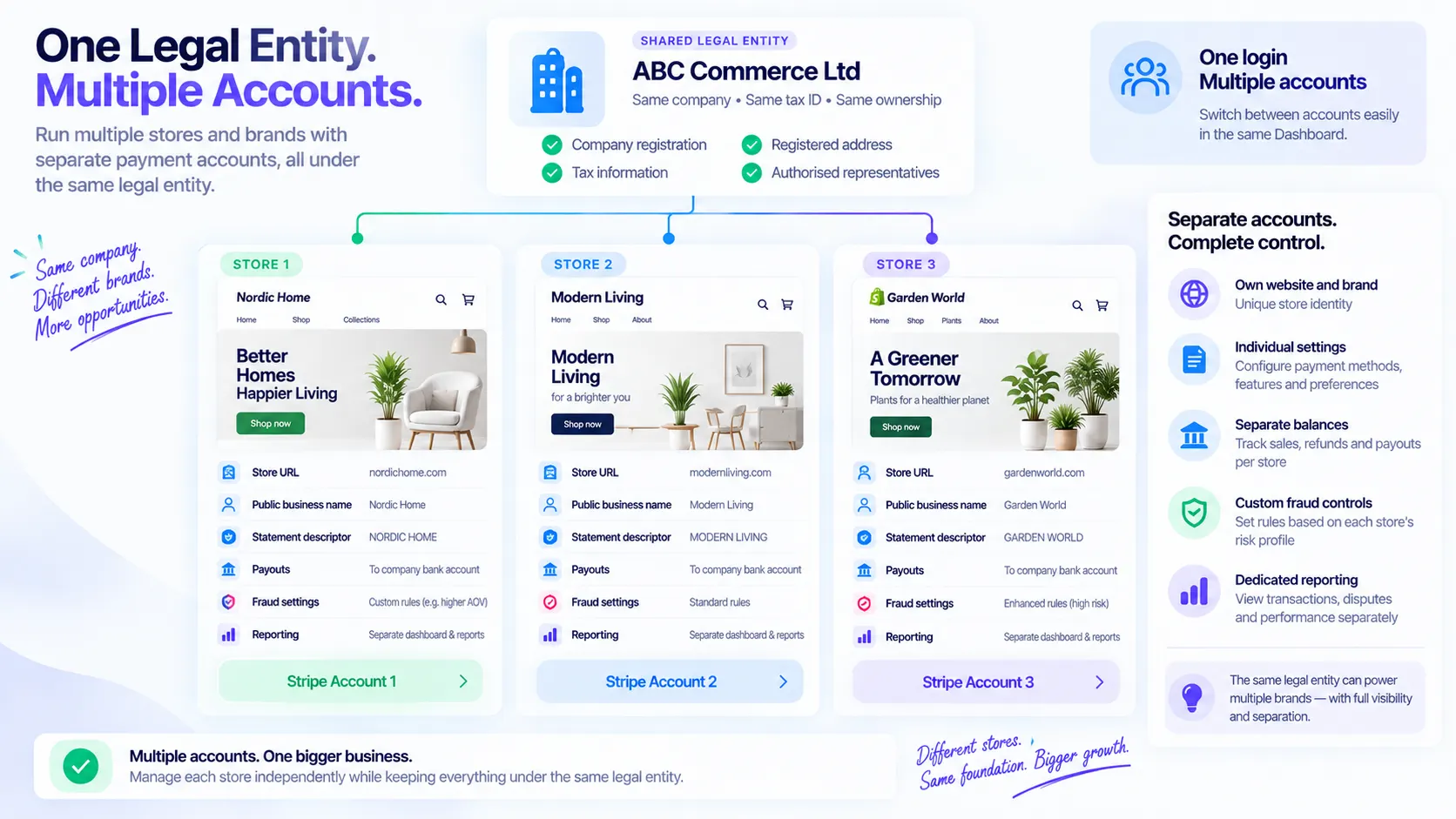
Think of the setup as one shared underlying business with separate payment environments for Nordic Home, Garden World and Modern Living.
For each account, review the customer-facing and operational settings that shape how that store processes payments.
- Website
- Business description
- Public business name
- Customer support information
- Statement descriptor
- Payment configuration
- Payout configuration
- Account settings
- Reporting
- Policy links
- Fraud configuration
Do not assume your first account's configuration automatically becomes the correct configuration for your second store.
Important: approval is not automatically inherited
If Account A has processed successfully for three years and Account B is newly created under the same legal entity, Account B should not be treated as automatically inheriting Account A's history, approval status, special pricing or special arrangements.
Stripe states new accounts are subject to standard policies and pricing and do not inherit special statuses or similar considerations from an existing account.
Before creating the additional account
The website should accurately represent the business you are asking Stripe to process payments for. Prepare the store and account information before beginning onboarding.
- New store URL
- Legal business details
- Tax information
- Representative details
- Payout bank information
- Support contact information
- Live policy pages
- Complete Shopify store
- Accurate product descriptions
- No placeholder products
- No broken links
- No empty policy pages
Step 1: create the additional Stripe account
Stripe support documentation says users can create a new account from the Dashboard account selector by choosing New account.
Do not create a Stripe Connect platform simply because you want another normal Stripe account for another store. Connect solves a different use case.
Step 2: give the account a clear name
Use an internal account name that makes the store immediately recognizable. Nordic Home - Shopify and Garden World - Shopify are clearer than Account 2 or New Stripe.
Step 3: reuse the correct legal entity
If the new store genuinely belongs to the same registered business, select the existing legal entity when Stripe offers that option.
Do not select an existing entity simply because it is convenient. The new store must genuinely belong to that business.
- Legal business name
- Country
- Entity type
- Company registration information
- Tax information
- Registered address
Legal entity vs store brand
The legal entity can remain ABC Ecommerce Ltd while each store has its own legitimate trading identity, such as Nordic Home, Modern Living or Garden World.
The legal entity should also make sense on the Shopify store. A better disclosure is Nordic Home is operated by ABC Ecommerce Ltd. Exact legal disclosure requirements depend on jurisdiction.
Bad example
Stripe says ABC Ecommerce Ltd, Shopify terms say XYZ Retail Ltd, the website footer shows an unrelated company and the bank account belongs to an unrelated individual.
Better example
Nordic Home is operated by ABC Ecommerce Ltd, with store policies, public details and payout information aligned to that business.
Step 4: add the correct store website
Nordic Home should use nordichome.com and Garden World should use gardenworld.com. Avoid copying the first store website into every additional account.
Step 5: describe what the new store actually sells
A weak description is Ecommerce business. A better description is UK ecommerce retailer selling indoor furniture, lighting and home accessories directly to consumers through nordichome.com. If a second store sells garden products, describe that store accordingly.
Step 6: configure only the products you need
During setup, Stripe may offer different products and capabilities. Do not enable everything just because it appears on screen. Keep the initial setup relevant to the actual payment operation.
Step 7: configure the payout bank account carefully
Where Stripe offers an eligible existing bank account, merchants may be able to select it for the additional account. Check that the Stripe legal entity and bank beneficiary match ABC Ecommerce Ltd, and do not casually connect an unrelated person's bank account to a company Stripe account.
Step 8: review business details again
Do not click through simply because information is pre-populated. Check the legal name, company number, tax information, registered address, website and public information.
Step 9: complete representative verification
Stripe may need to verify an authorized representative or request additional identity information. Use genuine and current personal information, identity documents, business documents and address details where required.
Step 10: describe products and fulfilment accurately
Be consistent about what products or services you offer, where you sell them and how they are delivered. If the Shopify store says delivery takes 3 to 5 working days, avoid telling Stripe something materially different.
Step 11: configure fraud protection
Each additional account may need its own payment-risk configuration. A rule that works for one store may not be appropriate for another.
- Average order values
- Customer countries
- Products
- Fraud patterns
- Payment methods
- Fulfilment models
Step 12: review tax settings
Do not assume creating another Stripe account solves tax obligations. If using Stripe Tax, configure it according to the actual tax setup and seek appropriate tax advice where necessary.
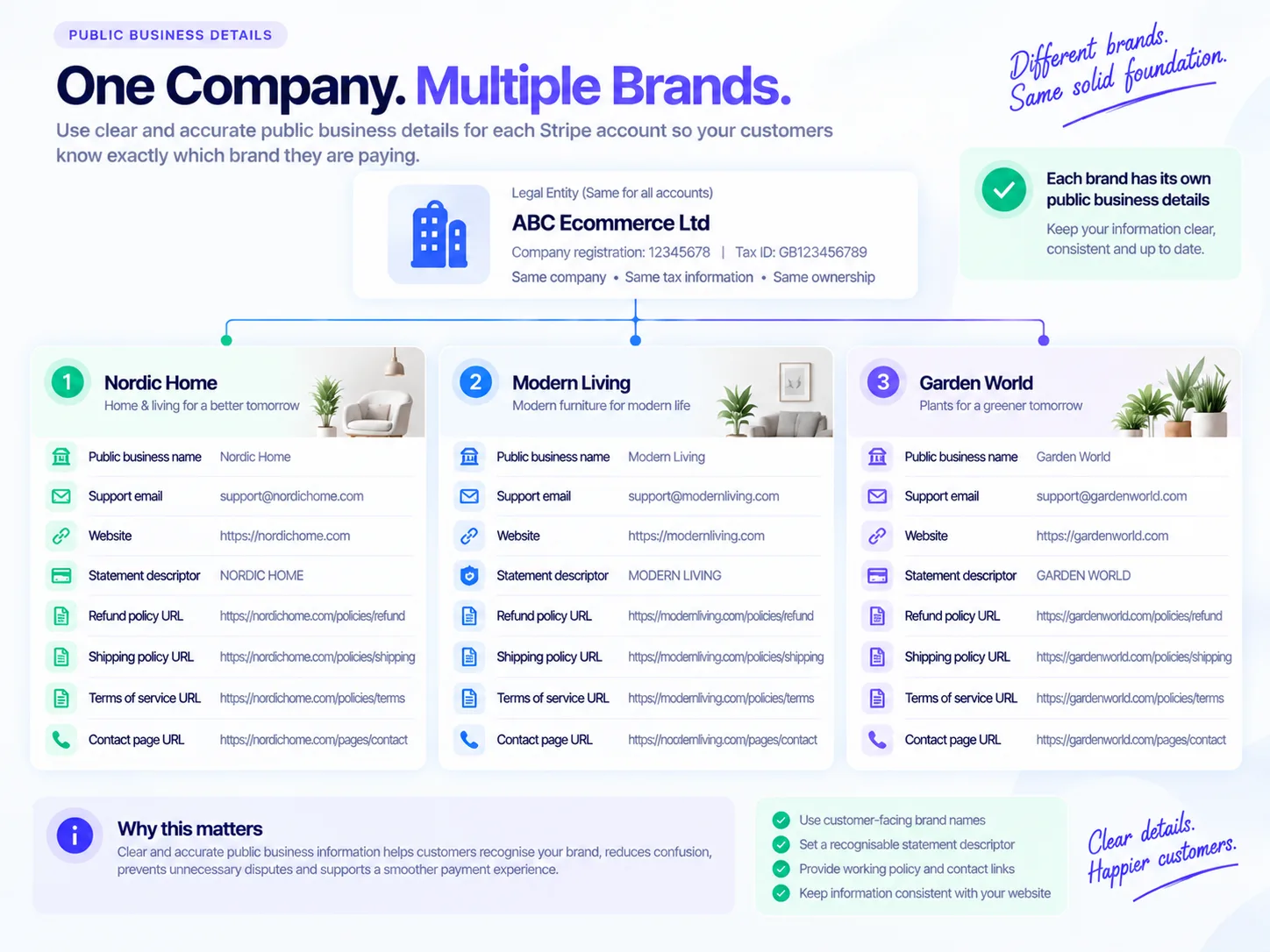
Step 13: configure public business details for each store
This is one of the most overlooked areas. Customers should understand which store charged them and how to contact support if they have a question.
- Public business name
- Customer support email
- Customer support telephone
- Website
- Statement descriptor
- Policy URLs
Statement descriptors matter even more with multiple brands
If a customer buys from gardenworld.com but the statement shows an unfamiliar brand from another store, the customer may not recognize the transaction. Where permitted by Stripe descriptor rules, configure a descriptor appropriate to the customer-facing store, such as GARDENWORLD.
Step 14: complete the final account review
Before live processing, check payouts, public details, statement descriptor, support contacts, policy links, remaining activation requirements and the correct account selected in Stripe Dashboard. Switch between accounts and confirm you are editing the intended store.
The most common mistake: assuming everything is shared
Some information may be shared, some may be copied and some remains separate. Treat each account as a real payment environment.
Myth: Account A is approved, so Account B is automatically approved.
Reality: New accounts are reviewed under Stripe standard policies and requirements.
Myth: Account A's website is correct, so Account B's website is correct.
Reality: Each account should represent the store using it.
Myth: Account A has correct public details, so Account B inherited them.
Reality: Public details should be reviewed separately.
Myth: Account A has good processing history, so Account B receives identical treatment.
Reality: New accounts do not automatically inherit special statuses or similar considerations.
Other common mistakes merchants make
Most problems come from treating account creation as a copy-and-paste exercise instead of a review of the actual store and legal structure.
Using sub-account incorrectly
Problem: The term can be confused with Stripe Connect connected accounts.
Fix: Use additional Stripe account for normal merchant accounts.
Selecting the wrong legal entity
Problem: The store is assigned to a company that does not actually operate it.
Fix: Use the genuine registered business.
Using the wrong website
Problem: Every account points to the first store domain.
Fix: Use the specific domain for each store.
Copying another store description
Problem: The account describes products the second store does not sell.
Fix: Describe the actual products and fulfilment model.
Ignoring public details
Problem: Customers cannot recognize the charge.
Fix: Review public name, support details and descriptor.
Using the wrong bank beneficiary
Problem: Payouts point to an unrelated person or business.
Fix: Match the bank beneficiary to the legal entity where required.
Assuming previous approval carries across
Problem: The merchant expects automatic approval.
Fix: Prepare each account for its own review requirements.
Using the account for an unrelated business
Problem: The account no longer matches the verified entity or store.
Fix: Create and verify the correct structure instead.
Should you use Stripe Organisations?
If a merchant operates multiple accounts related to the same business, Stripe recommends considering an Organisation for centralized reporting and management. For example, ABC Ecommerce Ltd may group Nordic Home, Garden World, Modern Living and Wholesale Stripe accounts. An Organisation is different from simply creating another account.
Multiple accounts vs Stripe Connect
Multiple Stripe accounts are useful when your own business operates separate stores, websites, brands or business lines and wants separate Stripe environments. Stripe Connect is designed for platforms and marketplaces that facilitate payments involving other businesses or connected accounts.
Stripe says businesses that need to provision many accounts automatically with centralized reporting and management should consider Connect rather than manually creating many independent accounts.
Option: Multiple Stripe accounts
Best fit: Your own business operates separate stores, websites, brands or business lines.
Option: Stripe Connect
Best fit: A platform or marketplace facilitates payments involving other businesses or connected accounts.
Multiple stores across different countries need extra care
Do not assume the same setup works across countries. Opening a Stripe account in another country generally requires local business, tax, address and banking information, subject to country-specific exceptions.
Choose the account country correctly from the beginning. Do not create international account structures casually.
Setup checklist
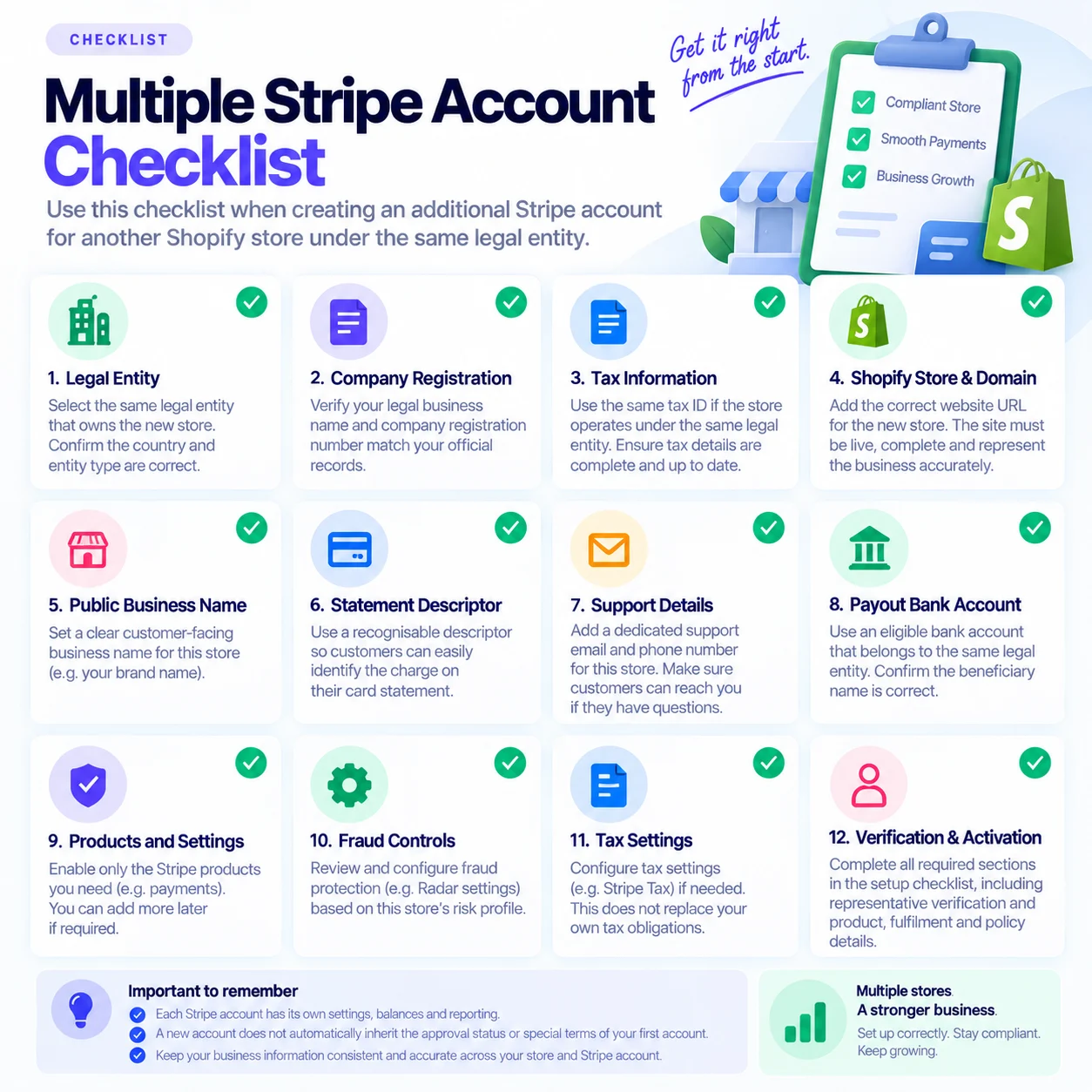
Multiple Stripe account checklist
Use this checklist before and after creating an additional Stripe account for another Shopify store under the same legal entity.
- The store genuinely belongs to the selected legal entity.
- The legal business name is correct.
- Company registration information is correct.
- Tax information is correct.
- Registered address is correct.
- Authorized representative information is correct.
- Beneficial ownership information is current.
- The correct Shopify store or domain is connected.
- The business description matches what the store sells.
- Industry and category are accurate.
- Fulfilment information matches the website.
- Shipping and refund policies are live.
- Public business name represents the correct store.
- Statement descriptor is recognizable.
- Support email and telephone information are correct.
- Payout bank information is appropriate for the legal entity.
- Fraud controls have been reviewed.
- Tax settings have been reviewed.
- All outstanding Stripe verification requirements have been completed.
- You are logged into the correct Stripe account before making changes.
Key principle
Same legal entity does not mean identical Stripe account
Running several Shopify stores does not necessarily require several companies.
If the stores genuinely belong to one legal entity, Stripe provides mechanisms for operating multiple accounts while reusing appropriate legal-entity information.
But treat each account as a real payment environment. Configure the correct website, store description, public business details, support information, statement descriptor, payout information, policies and payment settings for each store.
That gives Stripe a clearer picture of the business and gives customers a clearer understanding of who they are paying.
This guide is for general merchant education and is not legal, financial, tax or compliance advice. Always review Stripe's official documentation and the requirements shown in your own Stripe account.