Nabeyond ltd t/a CartDNA is a CartDNA is a Shopify Payment App Development Partner
Every Shopify store has a hidden myshopify.com URL powering the entire backend — even when a custom domain is shown publicly. Whether you need it for admin access, app setup, or troubleshooting, this guide shows you exactly how to find it fast and use it safely.
Every Shopify store has a unique myshopify.com URL — knowing how to find it is essential for admin access, app setup, and troubleshooting
When you create a Shopify store, Shopify automatically assigns it a unique default subdomain in the format storename.myshopify.com. This is your store's permanent backend URL — it stays the same even after you add a custom domain like yourstore.com.
Think of the myshopify.com URL as your store's fingerprint. It's what Shopify uses internally to identify your store for admin access, API calls, app integrations, and payment processing. No matter how many times you change your custom domain or storefront design, the myshopify.com URL remains constant.
Most store owners only think about their myshopify.com URL when something goes wrong. Understanding when and why you need it can save you hours of troubleshooting. Here are the key situations where only the myshopify.com URL will do.
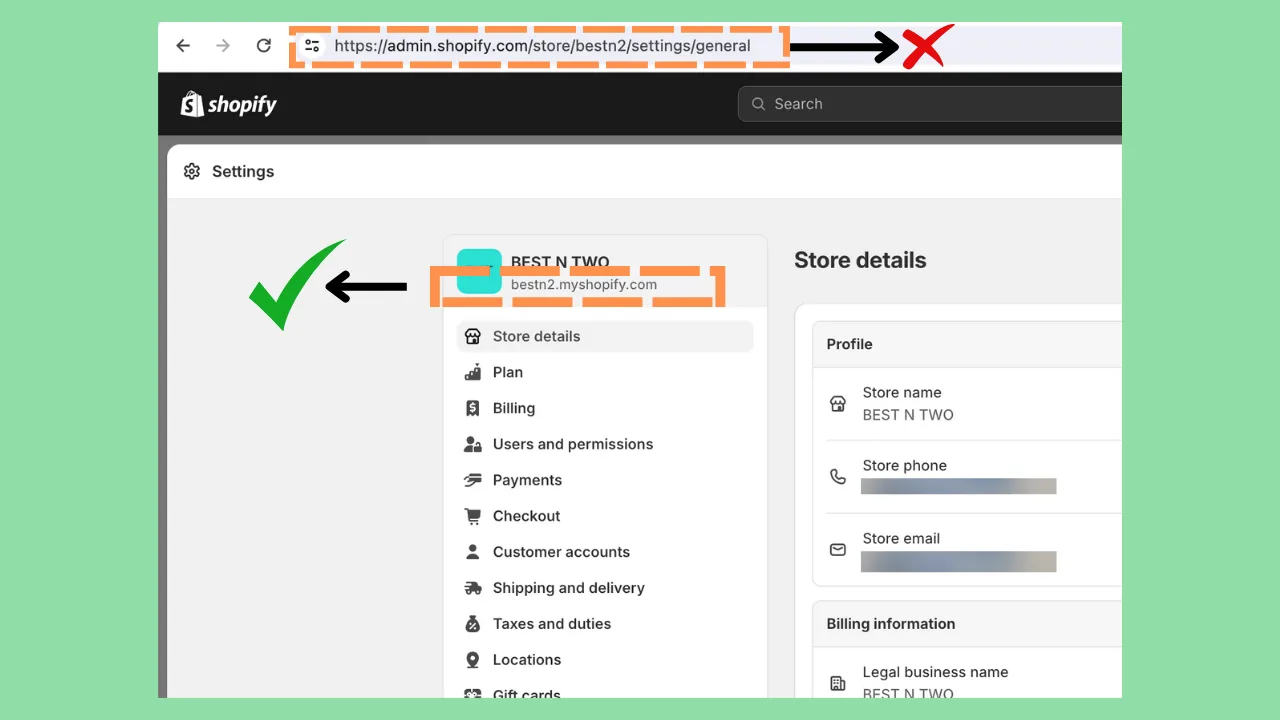
Your myshopify.com URL is always visible in your Shopify admin under Settings → Domains
Finding a myshopify.com URL depends on whether you are looking for your own store or trying to identify another Shopify store. These five methods cover both scenarios — from simple admin checks to more technical source-code approaches.
If you are looking for your own store's myshopify.com URL, this is the fastest route. Log in to your Shopify account and look at your browser's address bar — it will show yourstore.myshopify.com/admin. You can also go to Settings → Domains inside your admin, where your myshopify.com URL is listed as your primary domain before any custom domains.
Order confirmation emails sent by Shopify stores often contain the myshopify.com URL in links, tracking references, or the reply-to address. If you have placed an order with a store and need to identify their myshopify domain, check the email source — the myshopify.com URL frequently appears in hidden tracking links or unsubscribe URLs embedded in the email footer.
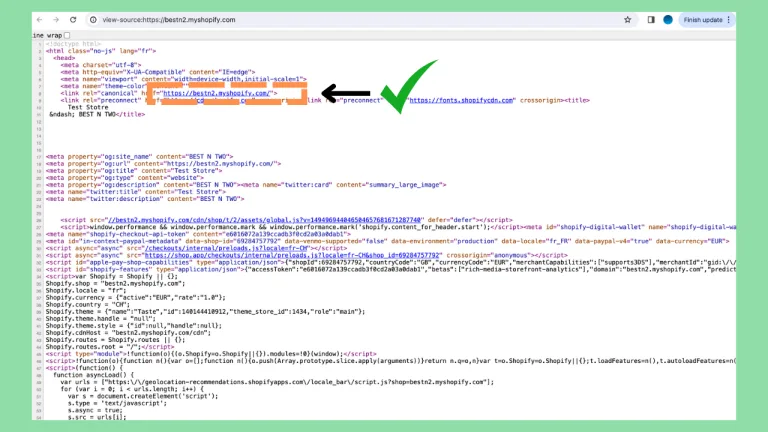
Every Shopify-powered website includes Shopify-specific code in the page HTML source. Viewing page source is the most reliable method to find the myshopify.com URL of any store — even one using a fully custom domain with no visible Shopify branding.
Tip: Look for Shopify.shop or myshopify.com/cdn in the source — these reliably expose the store's myshopify subdomain even when it is not shown publicly.
Several browser extensions and online tools are designed to detect whether a website runs on Shopify and reveal its myshopify.com URL. Tools like BuiltWith, Wappalyzer, and dedicated Shopify detection extensions can identify the platform and often expose the underlying myshopify domain in seconds.
If you know the store name or brand name, you can try accessing storename.myshopify.com directly. Shopify stores typically use a simplified version of their business name as their myshopify subdomain. This method is educated guesswork — always verify using page source or admin access before using the URL for anything critical.
Never rely on a guessed myshopify URL for app integrations, API calls, or payment gateway setup without verifying it first. An incorrect URL will cause failed connections and can significantly delay your setup.
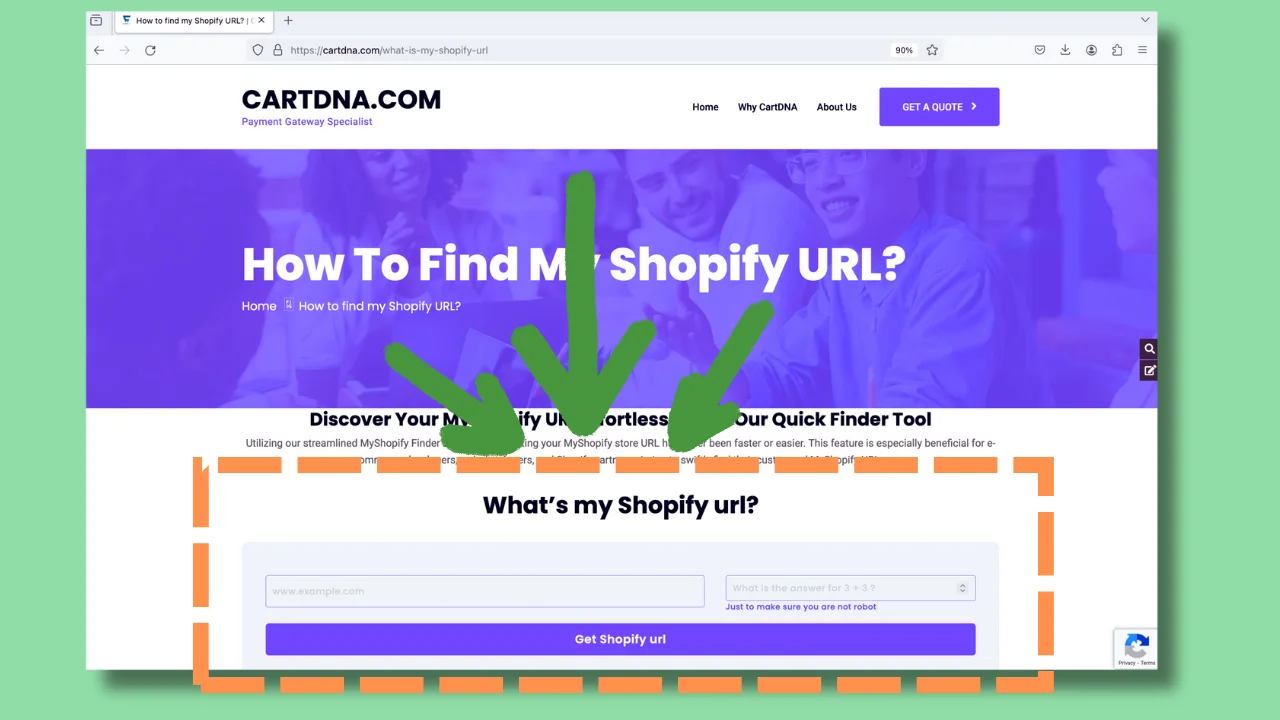
The page source method works on any Shopify store, even those using fully custom domains with no visible Shopify branding
Viewing a website's page source is the most definitive way to confirm whether it runs on Shopify and to extract its myshopify.com URL. Here is exactly what to look for once you have opened the source.
In most Shopify stores, you will find a JavaScript snippet like Shopify.shop = 'storename.myshopify.com' embedded in the page source. This is the most direct way to identify the exact myshopify URL without any ambiguity.
Browser extensions and detection tools can identify myshopify.com URLs in seconds without any technical knowledge required
Knowing how to find a myshopify.com URL comes with responsibility. Here is what to keep in mind when using this information — whether for your own store or when identifying other stores.
While your myshopify URL is technically discoverable, avoid sharing it unnecessarily in public forums or unverified support channels. Your admin at storename.myshopify.com/admin is protected by your Shopify login, but minimising exposure is always best practice.
Order confirmation emails from Shopify stores frequently contain myshopify.com URLs in tracking links and email footers
No — your myshopify.com URL is permanent and cannot be changed after your Shopify store is created. The subdomain is assigned at setup and stays fixed. If you want a different-looking public URL, you can add a custom domain (like yourstore.com), but your myshopify.com domain remains the backend identifier forever.
The most reliable methods are: (1) check the raw source of the order confirmation email and search for .myshopify.com; (2) visit the store's website, view page source (right-click → View Page Source), and search for Shopify.shop or myshopify.com; (3) use a detection tool like BuiltWith or Wappalyzer to identify the store's backend domain. The page source method works on virtually every Shopify store.
Shopify apps use your myshopify.com URL as your store's unique identifier during the OAuth authentication process. When you install an app, it requests permission from Shopify using this URL, which tells the app exactly which store it is connecting to. Without the correct myshopify URL, app installations will fail or connect to the wrong account.
If you close or cancel your Shopify store, the myshopify.com URL associated with it is eventually retired and may not immediately be available for reuse. If you reopen or transfer your store, the original myshopify URL is typically restored. This makes the myshopify URL a more reliable long-term store identifier than a custom domain, which could be transferred to a completely different platform.
Now that you know how to find your myshopify.com URL, make sure your payment gateway setup is just as solid. CartDNA connects Shopify merchants with the right payment providers — fully compatible, Shopify-approved, and optimised for your market.
